Changelog
Get the latest updates and improvements to ControlCom Connect.
June 4, 2026
Enhanced Alarm Management
This update to ControlCom Connect introduces advanced workflows for managing industrial alerts and more ways to share your data. Plant managers and integrators can now coordinate faster response times through dedicated alarm assignments and real-time interface updates.
Streamlined Alarm Response
Responding to critical events in water/wastewater or manufacturing environments is now more collaborative. These new tools ensure that every alarm is tracked from the moment it triggers until it is resolved.
- Assign and Acknowledge: Now you can assign specific alarms to team members and acknowledge them directly within the platform. This makes it clear who is handling a situation.
- Alarm Troubleshooting Page: A new dedicated view provides context for every event, including timelines and correlation visualizations to help you find the root cause faster.
- Email Notifications: Stay informed immediately when an alarm is assigned to you, reducing response time for critical equipment failures.
- Notes and Context: Add notes to alarms to document troubleshooting steps or provide site-specific context for other operators.
Data Portability and Exports
Moving data out of ControlCom Connect for reporting or secondary analysis is now a simple, one-click process. This is built for facilities that require external documentation for compliance or deeper analytics.
- CSV Timeseries Export: Download raw device data directly into a CSV format for use in spreadsheet software or external databases.
- PNG Chart Export: Save any ECharts visualization as a high-resolution PNG image for inclusion in status reports or maintenance logs.
Real-Time UI and Diagram History
The platform now feels more responsive and provides better protection for your engineering work. Real-time data updates now appear in the UI without requiring a page refresh, keeping your view of the plant floor current.
Version Control for Designs
To protect your configuration work, dashboards and diagrams now maintain a history of the last 20 saves. This allows you to revert changes if a configuration error occurs during site commissioning.
Visual Context in Diagrams
You can now embed images directly into your diagrams. This allows for more realistic HMI screens by including facility photos, equipment schematics, or site maps as a backdrop for your live data points.
May 14, 2026
Device Templates for Faster Fleet Management
Managing a large fleet of field sensors just got simpler. We have overhauled how device data is organized within ControlCom Connect, making it easier for integrators to scale their monitoring systems while maintaining data integrity across the platform.
Structured Device Templates
Organizing variables and commands is now more intuitive with a new device template structure. This update allows you to define the behavior and data points of your hardware in a centralized way, ensuring consistency across all installations.
Organized Variables: Group and define sensor data more clearly within each template.
Command Definitions: Standardize the instructions sent to your hardware, making it easier to control multiple devices of the same type.
Faster Deployment: Once a template is created, you can apply it to new devices instantly, reducing the time spent on manual configuration during site setups.
Template and Gateway Integration
To help plant managers maintain a clear view of their network hierarchy, device templates now link directly to ControlCom gateways. This means you can manage all connected hardware through the specific gateway that handles its traffic, providing better visibility into your field architecture and simplifying remote monitoring tasks.
Improved Data Ingestion Reliability
We have updated the core data processing engine to ensure your industrial data flows more reliably from the edge to the dashboard. These changes mean less latency and fewer missed data points, which is critical for accurate predictive analytics and real-time alarming in water/wastewater and manufacturing environments.
What This Means for You
Fewer Truck Rolls: Better organization and reliable data mean you can troubleshoot more from the office.
Simpler Scaling: Adding ten or one hundred new sensors follows the same structured workflow.
Clearer Insights: With standardized templates, your data is more consistent, making it easier to compare performance across different sites or assets.
May 6, 2026
Device Diagnostics and Security Enhancements
Managing your industrial hardware and facility data is now more transparent. This update to ControlCom Connect brings better diagnostic tools for field devices, enhanced security for large teams, and smarter ways to anticipate system changes through predictive graphing.
Deep Diagnostics for Faster Troubleshooting
Understanding why a device is offline or behaving unexpectedly is now simpler. We have added tools to the Device Details page that provide immediate context for field technicians and plant managers.
Activity Timeline: Track device events over time to see exactly when a status changed.
Troubleshooting Messages: Access a log of device messages from the last 24 hours to identify communication errors quickly.
Health Metrics: View real-time connection status and health indicators directly on the device dashboard.
Live Namespace Values: See variables update in real-time within the interface, ensuring you are looking at current field data.
Enhanced Security and Access Management
As your operations scale, managing who can see and edit specific data becomes critical. ControlCom Connect now supports more granular security protocols and centralized authentication.
Custom User Roles: Assign specific roles to users to control access to features and data sets within the platform.
Login Awareness: New security alerts now include the geographical location of login attempts, helping you identify unauthorized access.
Smarter AI and Predictive Insights
We are making the ControlCom Connect AI Assistant more effective by allowing it to understand the specific context of your industry and facility.
Domain-Specific AI Knowledge
You can now define domain knowledge rules that the AI Assistant uses to provide more accurate answers tailored to your specific facility type, whether it’s water/wastewater, manufacturing, or healthcare.
Trend Predictions on Graphs
Graphs now support trend predictions. This means you can see where your data is heading based on historical patterns, allowing for proactive adjustments before thresholds are reached and alarms are triggered.
Expanded Protocol and Device Support
Connecting a wider variety of hardware is now easier with improved support for popular industrial protocols and bulk configuration tools.
LoRaWAN Management: Connect and manage LoRaWAN devices and gateways directly within the platform.
Sparkplug B Rules: Import Sparkplug B rules via CSV to speed up the configuration of your MQTT-based devices.
Composite Commands: Send more complex instruction sets to your devices, including the ability to copy and paste command configurations between similar hardware.
May 1, 2026
Predictive Monitoring With Anomaly Detection
This update to ControlCom Connect introduces smarter ways to monitor your industrial assets and faster tools to design your HMI screens. From spotting unusual data patterns automatically to streamlining how you edit complex system diagrams, these changes focus on reducing downtime and saving engineering time.
Identify Issues Sooner with Anomaly Detection
You can now enable anomaly detection to automatically identify unusual patterns in your data. Instead of relying solely on fixed thresholds, this feature helps plant managers and operators catch deviations that might indicate equipment failure or process inefficiencies before they trigger a critical alarm.
Faster HMI Design and Bulk Editing
Building detailed diagrams for water/wastewater facilities or manufacturing lines is now much more efficient with new multi-select and text tools.
- Multi-Element Editing: Select and edit multiple HMI elements simultaneously. This means you can update colors, sizes, or properties across a group of components at once, rather than one by one.
- Diagram Text Search: You can now find and replace text content within your diagrams. This is perfect for quickly updating labels or descriptions across large-scale system views.
- Visual Status Indicators: Diagram elements can now pulsate when an associated variable is "on." This provides an immediate, clear visual indicator of active machinery or flows.
- Enhanced Button States: HMI buttons now support visual states for warnings, errors, and success, giving operators better feedback on system actions.
Smoother Dashboard Trends and Commands
Viewing and interacting with live data is now more intuitive with improved graph controls and command management.
- Scrolling Live Graphs: Live graphs on your dashboard now support scrolling. This lets you view longer trends and historical data without interrupting the live feed.
- Bulk Command Imports: Save time during site setup by importing multiple device commands at once. We have also improved the workflow for sending commands directly from the diagram editor.
- Interactive Analytics: New analytics features provide deeper insights into your facility data, paired with a smoother, more responsive experience in the live graph view.
April 23, 2026
Expanded API and Improved Diagram Controls
ControlCom Connect continues to evolve as a flexible hub for industrial monitoring and analytics. This latest update focuses on providing integrators with more powerful tools to customize the platform and gives operators more granular control over their system visualizations.
Standardized API for Custom Integrations
We have significantly expanded and standardized the ControlCom Connect API to make it easier for you to build custom applications or connect the platform with your existing SCADA, ERP, or maintenance management software. This makes the platform more adaptable for water/wastewater, manufacturing, and healthcare facilities that require specialized data flows.
New Data Endpoints: You can now programmatically manage energy management bills, weather data, and AI chat sessions.
Organization Branding: Automate how your branding and organization settings are applied across the platform.
Broad Support: We have enhanced API support for managing alarms, assets, devices, virtual variables, and user profiles, ensuring a consistent developer experience.
More Control Over HMI Diagrams
Building and maintaining your digital twin diagrams is now more efficient. New refinements allow for better organization and more precise visual feedback on the plant floor.
Granular Instance Visibility: You now have the power to control the visibility of individual instances directly within your diagrams. This means you can show or hide specific components based on operational needs without affecting the rest of the layout.
Streamlined Publishing: To help keep your projects organized, you can now rename a diagram at the moment you publish it. This simplifies versioning and ensures that your operator screens always have clear, descriptive names.
Accurate Gauge Visuals: We have improved the rendering of radial gauges. These indicators now display data with higher precision, giving your team a more reliable view of critical metrics like pressure, flow, and tank levels.
April 16, 2026
Find and Replace + Radial Cards in the Diagram Editor
Building complex HMI screens for your industrial systems just got much faster. The latest update to ControlCom Connect focuses on reducing the manual work required to build and maintain detailed system diagrams, especially when managing large numbers of variables across production lines.
Find and Replace Variables
When you are managing a large-scale deployment, updating variable mappings one by one is time-consuming. Now you can find and replace variables directly within the diagram editor. This makes it easier to duplicate screens for similar assets or update your data mapping without rebuilding elements from scratch.
New Radial Card Visuals
This update adds a Radial Card primitive to your toolkit. This new element provides a clean, circular visual for displaying key performance indicators (KPIs) like pressure, temperature, or motor speed. It is designed to give operators high-level status updates that are easy to read from across the plant floor.
Advanced Element Control and Logic
We have added more sophisticated controls for element visibility. This means you can create dynamic diagrams where parts of the interface appear or disappear based on real-time machine states. To help you set this up faster, the expression editor now includes quick actions for common logic tasks.
Improved Configuration Tools
Managing your hardware connections is now simpler with several updates to our core tools:
- MODBUS Client Editor: A more intuitive interface for configuring your MODBUS devices and addressing.
- Variable Selection: A smoother experience when browsing and selecting tags for your HMI elements.
- Asset and Namespace Display: Clearer organization of your facility data, making it easier to find the right sensor in a large hierarchy.
These improvements were built for integrators who need to deploy systems quickly while maintaining a high standard of visual clarity for plant managers and operators.
April 15, 2026
Asset Hierarchies and Relationships for Facilities
Managing complex industrial environments requires more than just a list of devices. ControlCom Connect now provides deeper organizational tools to help you map your digital twin to your physical facility more accurately.
Organize with Hierarchical Asset Structures
You can now nest assets within one another to mirror your actual plant layout. Instead of flat lists, you can organize your monitoring by site, production line, or specific machine assemblies. This makes it easier to navigate large-scale deployments and ensures your team finds the right data without searching through hundreds of sensors.
Define Relationships and Asset Types
Beyond simple nesting, you can now define how assets relate to one another and categorize them by type. Standardizing asset types—like centrifugal pumps or HVAC units—means you can manage groups of equipment more effectively across different locations. Mapping relationships helps you understand dependencies between your hardware, leading to faster troubleshooting during downtime.
Refined Device Setup and Modbus Tools
We have added improvements to the configuration workflow to make device onboarding faster:
- Variable Import Tracking: When importing variables to a device, the system now displays a count of the items being added, giving you immediate confirmation of the data being mapped.
- Modbus SDK Enhancements: The Modbus SDK editor includes a new button to create variables directly within the interface, reducing the steps needed to get a PLC or controller communicating with the platform.
April 12, 2026
Interactive HMI Screens and Asset Management
This update for ControlCom Connect introduces interactive controls to your system diagrams and provides better tools for managing your facility hierarchy. Whether you are an integrator setting up a new site or a plant manager cleaning up old data, these changes make the platform more functional and easier to navigate.
Interactive Buttons for HMI Diagrams
You can now add interactive button elements directly to your diagrams within the HMI Editor. This allows you to build more functional interfaces for your operators. Instead of just viewing data, you can design your SCADA-style screens to include triggers for specific actions or navigation paths.
- Custom actions: Configure buttons to interact with your system variables.
- Simplified navigation: Create buttons that jump between different assets or locations.
- Clearer interfaces: Use buttons to toggle views or reset dashboard parameters.
Streamlined Asset and Location Management
Keeping your IIoT environment organized is now easier. We have added the ability to delete locations and assets directly from the platform. If equipment is decommissioned or a site layout changes, you can remove those items to keep your views relevant and uncluttered.
This is particularly useful for large-scale deployments in water/wastewater or manufacturing where assets are frequently rotated or updated. Removing old assets ensures your team focuses only on live, active equipment.
Visual Refinements
We have also polished the appearance of the data tables and graphs within the Explorer. These visual enhancements make it easier to read high-density industrial data at a glance, helping you identify trends or anomalies faster during your daily monitoring routines.
April 11, 2026
Data Explorer: Faster Analysis and Sharing
The ControlCom Connect Data Explorer just got a major upgrade, making it faster to analyze your industrial data and easier to share insights with your team. Here's what's new:
Faster, Smoother Experience
We've significantly improved the performance of the Data Explorer, especially when working with large datasets:
- Faster data table loading: View many variables over long time ranges without the wait.
- Interactive charts during loading: Zoom, pan, and explore your data even while new data is being loaded.
Easier to Get Started
New features help you quickly find the data you need:
- Quick time range buttons: Jump to common ranges (1h, 6h, 24h, 7d, 30d) with a single click.
- Clearer guidance: New users will find it easier to start exploring their data.
- Consistent navigation: Always know where you are with the "Data Explorer" title in the toolbar.
Save & Share Your Work
Collaborate more effectively with these improvements:
- Save Explorer configurations: Save your current setup (variables, time range, and settings) as a named configuration.
- Shareable views: The URL now preserves your full setup, allowing you to share precise views with your team.
- Persistent sessions: Refreshing the page no longer loses your work.
Better Data Table
We've enhanced the data table for easier analysis:
- Sortable columns: Click any column header to sort by that value.
- Relative timestamps: Hover over any timestamp to see how long ago it was (e.g. "2 hours ago").
- Responsive columns: Columns now resize to fill available space.
March 20, 2026
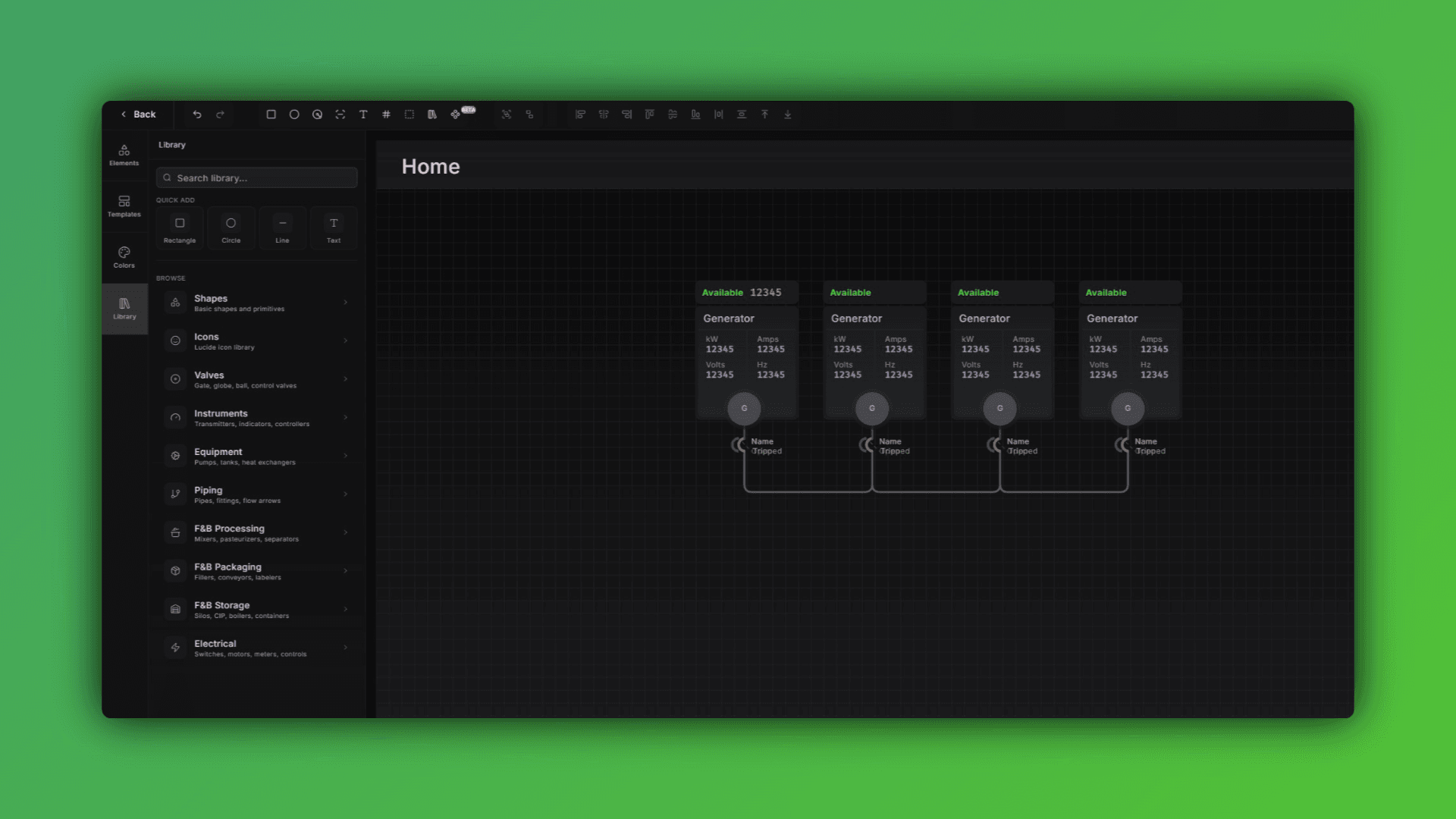
Diagram Editor: Faster Performance and In-Diagram Graphs
What's New in the Diagram Editor
If you're building out system diagrams for large facilities or complex IIoT architectures, this update is going to make that work noticeably faster and more flexible.
Here's what changed:
Performance Improvements for Large Diagrams
Diagrams with high element counts or large canvas sizes now load and respond significantly faster. Whether you're mapping a full water treatment plant or a multi-zone manufacturing floor, you'll see less lag when moving, selecting, or editing at scale.
Fill Properties with Animation on Elements
You can now control fill color and style on individual diagram elements based on your variable's value - allowing you to create bar fills, tanks or other necessary items.
Insert Graphs Directly into Diagrams
Need to show live trends or historical data alongside your system layout? You can now embed graphs directly on the diagram canvas. This means your operators get context — not just topology.
Quick-Edit Bar for Multi-Element Formatting
Select multiple elements and change font size, corner radius, and stroke weight all at once from the quick-edit bar. No more editing items one at a time to keep things consistent across a diagram.
New Line Path Styles
Three new path options are now available for connectors:
Elbow
Smooth Elbow
Curved
These changes came directly from feedback from integrators managing large-scale monitoring deployments. More diagram editor updates are in the pipeline — if you have something specific you're working around, reach out.
February 27, 2026
Custom Branding: Sidebar Colors and Logo Uploads
What's New
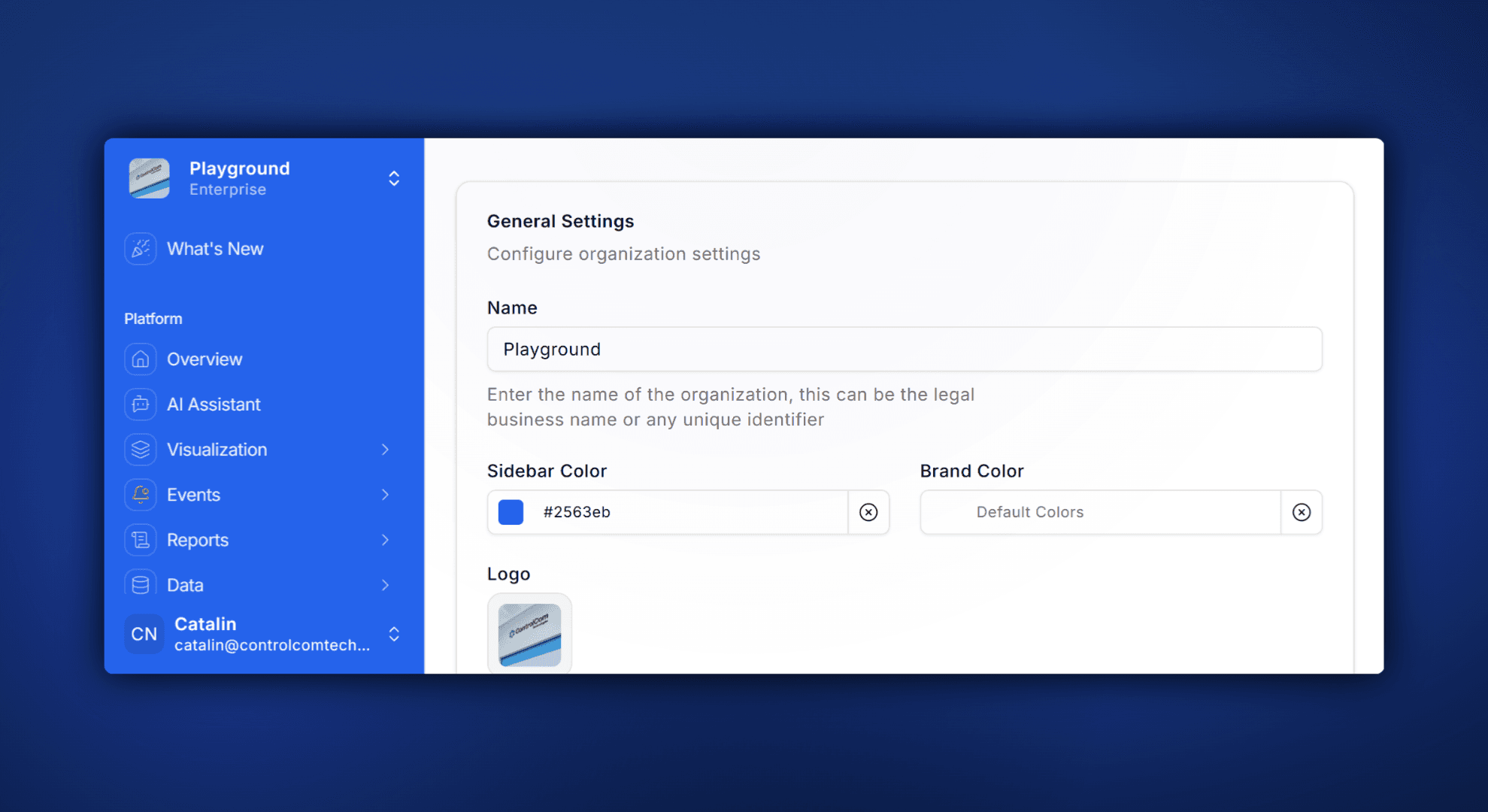
ControlCom Connect now lets you put your own brand on the platform. Upload a custom logo, pick your sidebar color, and give your team (or your customers) a monitoring experience that looks and feels like yours.
This is especially useful for OEMs and integrators who white-label their monitoring setup. Instead of a generic interface, your operators and clients see your brand every time they log in.
What You Can Customize
Logo: Upload your company logo to replace the default in the sidebar and login screen.
Sidebar Color: Match your sidebar to your brand palette with a simple color picker.
Consistent Experience: Your branding carries across the platform, so everything feels intentional and professional.
Why It Matters
For integrators managing multiple client accounts, branded dashboards build trust and reduce confusion. For plant managers, it's one less thing that feels like an outside tool — and one more thing that feels like part of the operation.
No code, no support tickets. Just head to Settings → Branding and make it yours.
February 12, 2026
Build Dashboards Faster With the AI Dashboard Builder
Build Dashboards Faster with ControlCom Connect's AI Dashboard Builder
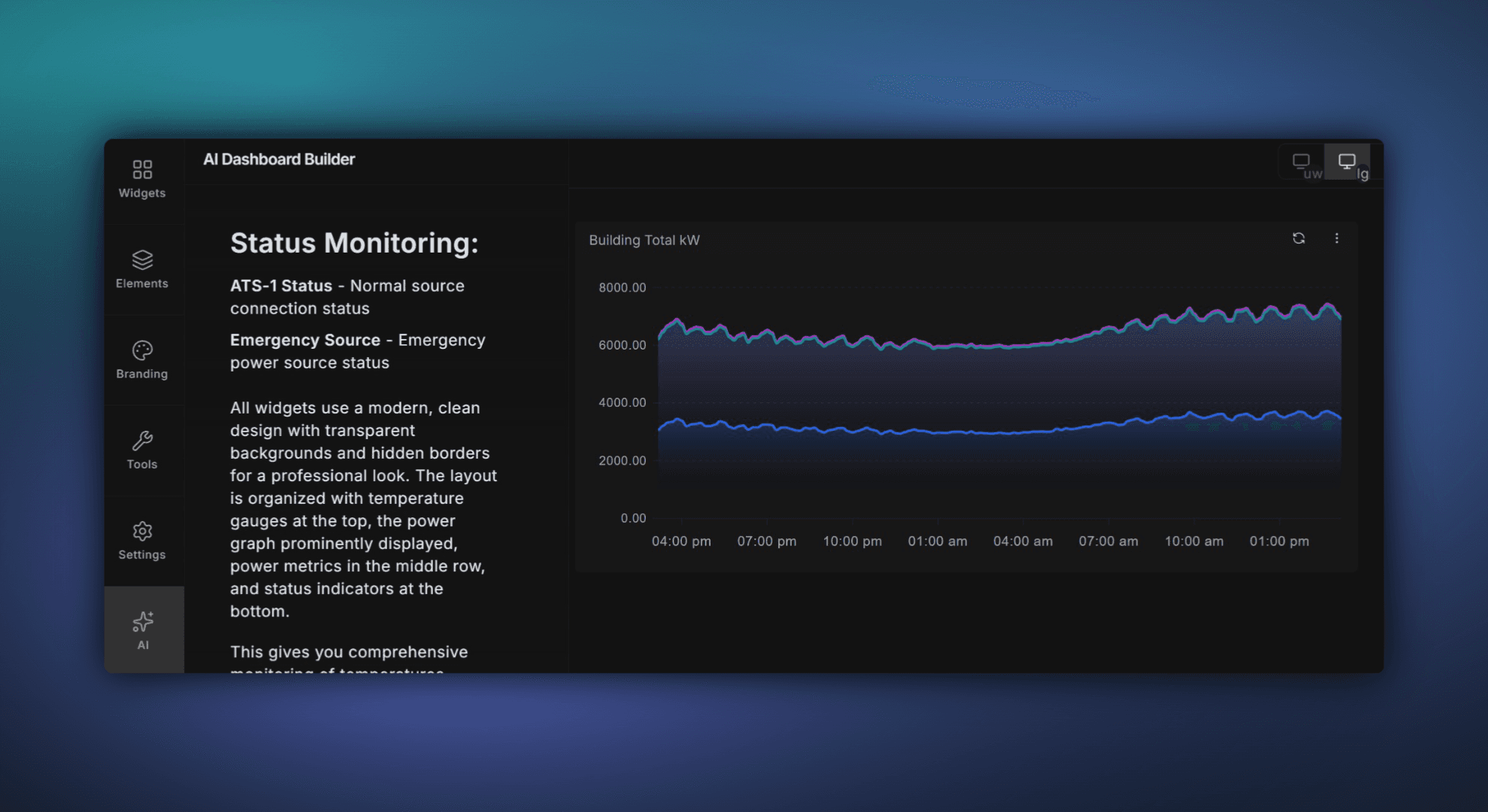
Building dashboards in ControlCom Connect just got a whole lot faster. The new AI Dashboard Builder lets you describe what you want to see — in plain language — and turns it into a working dashboard. It searches your assets, finds the right variables, and lays everything out for you. A few questions, a click, and you're done.
What It Does
Instead of manually searching for data points and dragging widgets onto a canvas, the AI Dashboard Builder handles the heavy lifting. Tell it something like "Show me pump station pressure and flow for the last 24 hours" and it will:
Search your connected assets and find the matching variables automatically
Suggest the right widget types (gauges, trends, tables) based on the data
Build a ready-to-use dashboard layout you can review and customize
Ask follow-up questions if it needs to narrow things down
It works with any asset or variable already in your ControlCom Connect environment — PLCs, SCADA systems, remote I/O, sensors, and everything in between.
Who It's For
This feature is designed for two groups that spend the most time building dashboards: integrators setting up client systems, and plant managers who need custom views for their teams. Whether you're configuring dashboards across dozens of sites or building a morning overview screen for your operators, the AI Dashboard Builder saves you time.
Works Across Industries
The AI Dashboard Builder works with any data already flowing into ControlCom Connect. That means it's ready for the verticals you work in today:
Water & Wastewater: Build operator screens for lift stations, treatment plants, and distribution systems in minutes.
Manufacturing: Get production line dashboards up without waiting on engineering to configure every tag.
Commercial & Industrial: Create building system overviews that pull from HVAC, power, and BMS data sources.
Healthcare: Set up facility monitoring views that track critical environment variables across floors or campuses.
OEM: Build standard dashboards for deployed equipment and customize them per customer.
How to Get Started
The AI Dashboard Builder is available now in ControlCom Connect. To try it out:
Open any project in ControlCom Connect
Click "New Dashboard" and select the AI Dashboard Builder option
Describe what you want to see
Review, adjust, and save
That's it. No training required. If you can describe what you need, you can build it.
January 15, 2026
Bulk Variable Replacement and a New Text Widget
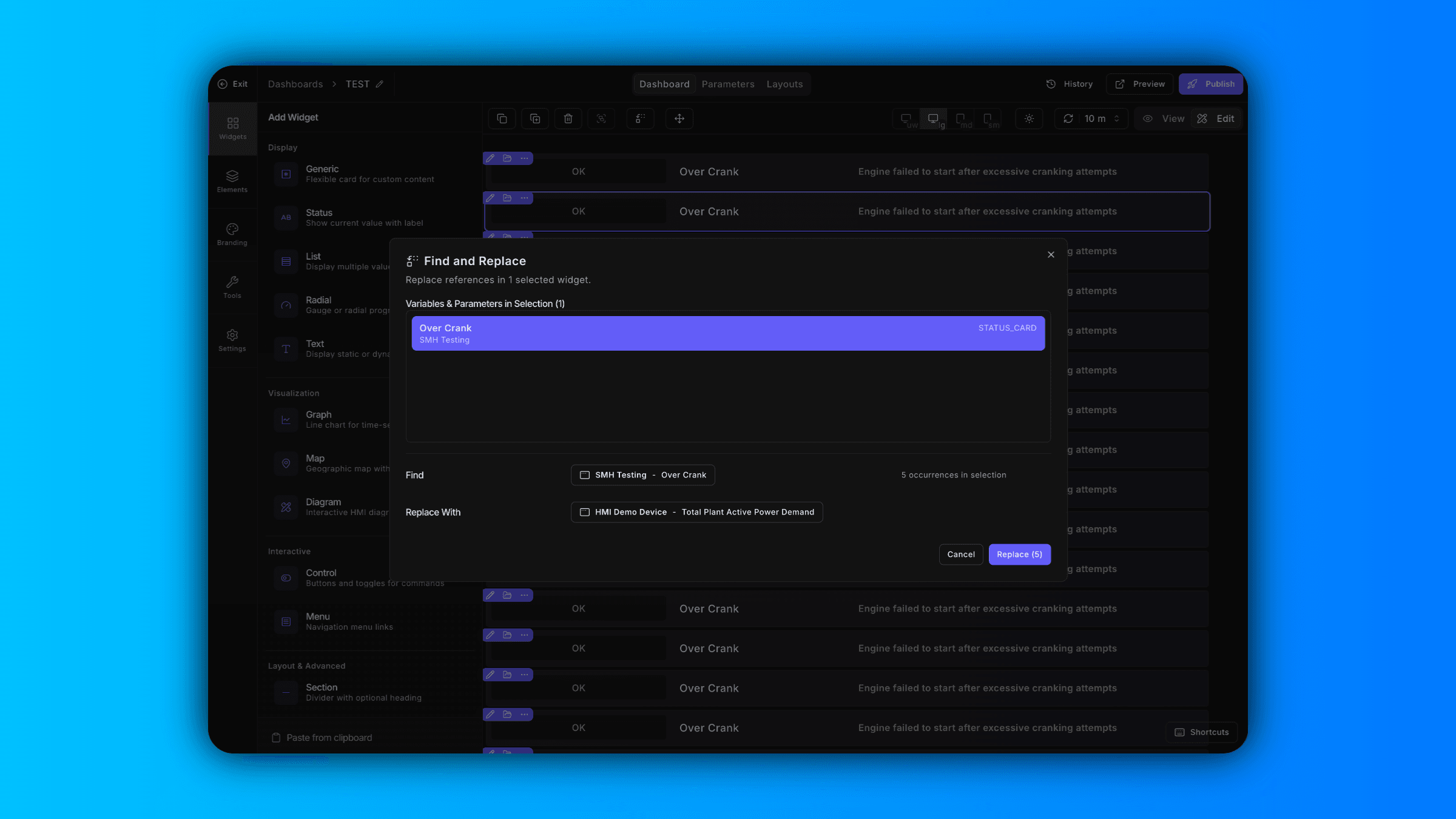
Find and Replace Variables Across Your Dashboard
Updating variables one widget at a time slows you down. Now in ControlCom Connect, you can find and replace variables in bulk directly from the dashboard editor.
Select specific widgets to update just what you need, or select the entire dashboard to swap variables across every widget at once. This is especially useful when you're cloning dashboards for new sites, reassigning tags after a PLC migration, or standardizing naming conventions across your facility.
What used to take 20 clicks now takes two.
New Text Widget for Static or Dynamic Content
The dashboard editor now includes a text widget that renders static text or pulls dynamic values from a variable.
Use it to add section headers, display real-time status messages, show calculated values, or label dashboard regions for clearer navigation. Integrators can build more informative dashboards without workarounds, and plant managers get dashboards that communicate context—not just data.
Keyboard Shortcuts Now in the Menu
Every keyboard shortcut is now available as a button in the editor menu. If you prefer clicking over key combos—or just need a reminder of what's available—it's all visible and accessible in one place.
January 9, 2026
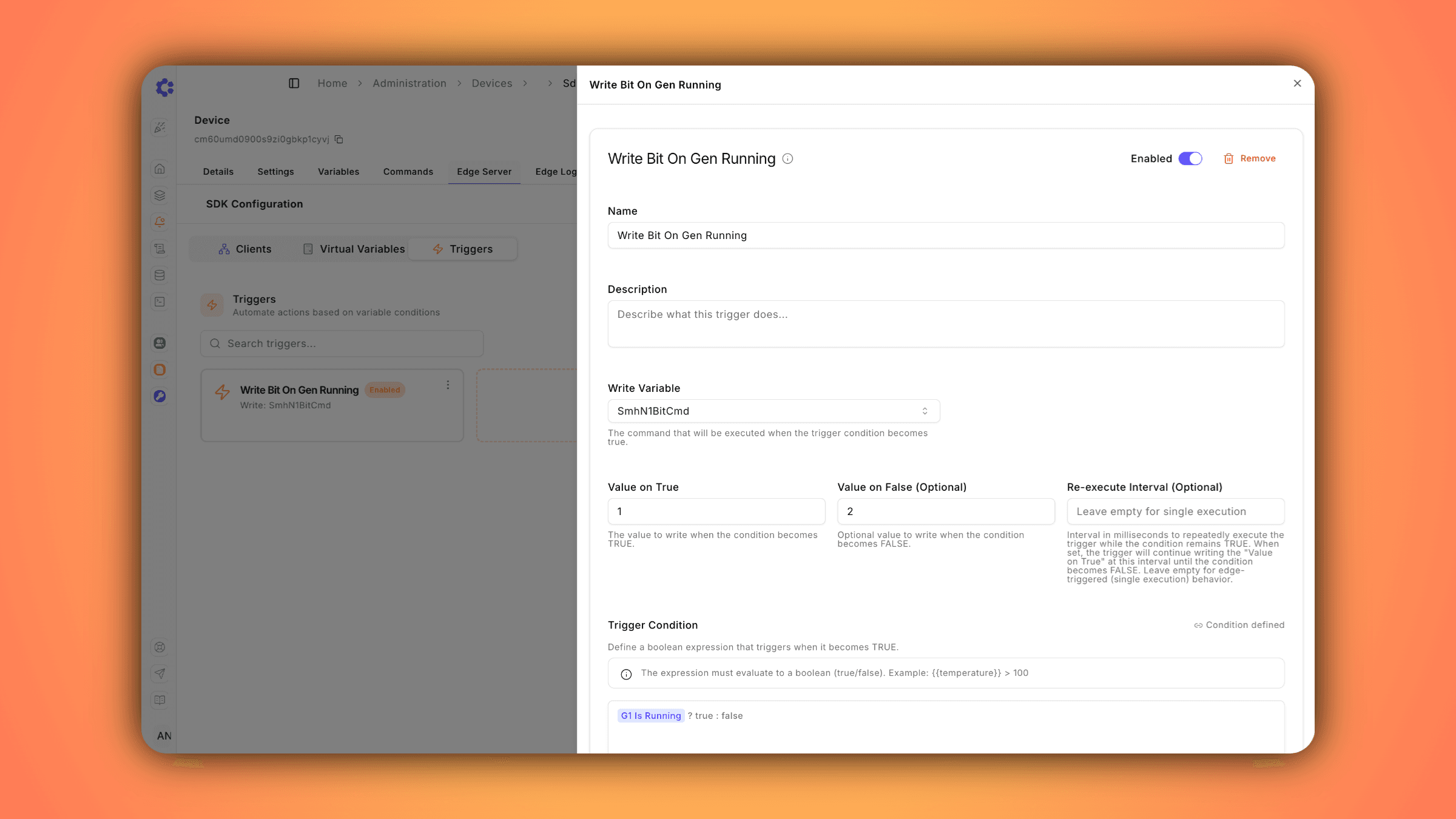
Edge Server v2.8.0: Real-Time Automation Triggers
Introducing Triggers: Edge-Based Automation for Real-Time Control
We're excited to announce Triggers, a powerful new Edge Server capability that enables automated command execution based on real-time device conditions—without requiring cloud connectivity.
What Are Triggers?
Triggers allow you to define conditional logic that automatically executes commands when specific conditions are met. When a trigger condition transitions from false to true, the Edge Server immediately writes a configured value to a designated command variable.
Key Benefits
Instant Response Times
Execute critical actions at the edge with millisecond-level response times. No round-trip to the cloud required.
Reliable Automation
Triggers continue operating even during network outages, ensuring your critical automations never miss a beat.
Flexible Configuration
Define complex boolean conditions using any device variable
Configure different actions for condition ON vs OFF states
Set optional re-execution intervals for continuous operation
Enable or disable triggers without deleting them
Common Use Cases
Safety Systems: Automatically shut down equipment when parameters exceed safe limits
Process Control: Start pumps when tank levels drop, activate cooling when temperatures rise
Equipment Protection: Trigger emergency stops on fault detection or overload conditions
Heartbeat Signals: Send periodic keepalive signals while systems are running
December 29, 2025
Faster Dashboard Editing with Keyboard Shortcuts
What's New
Building dashboards in ControlCom Connect just got faster. This update brings keyboard shortcuts, multi-widget selection, and smoother navigation to the dashboard editor.
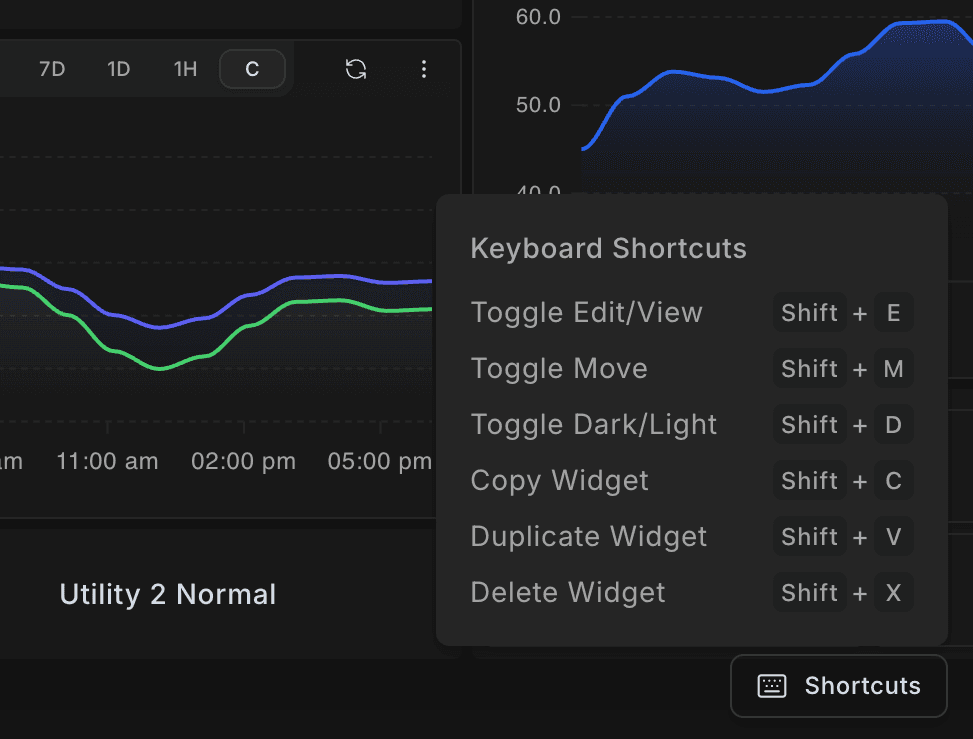
Keyboard Shortcuts
New keyboard shortcuts let you switch modes, copy widgets, and manage selections without reaching for your mouse. A Shortcuts button in the bottom-right corner of the editor shows all available commands.
Multi-Select Widgets
Select multiple widgets at once by holding Shift and clicking. Once selected, duplicate or delete your entire selection in one action—no more editing widgets one at a time.
Why It Matters
For integrators managing dozens of dashboards across sites, these updates mean less time clicking through menus and more time focused on what matters: keeping operations running. Small workflow improvements add up—especially when you're building dashboards for water systems, manufacturing floors, or distributed OEM equipment.
December 27, 2025
Preview Dashboards with Simulated Data in ControlCom Connect
What's New
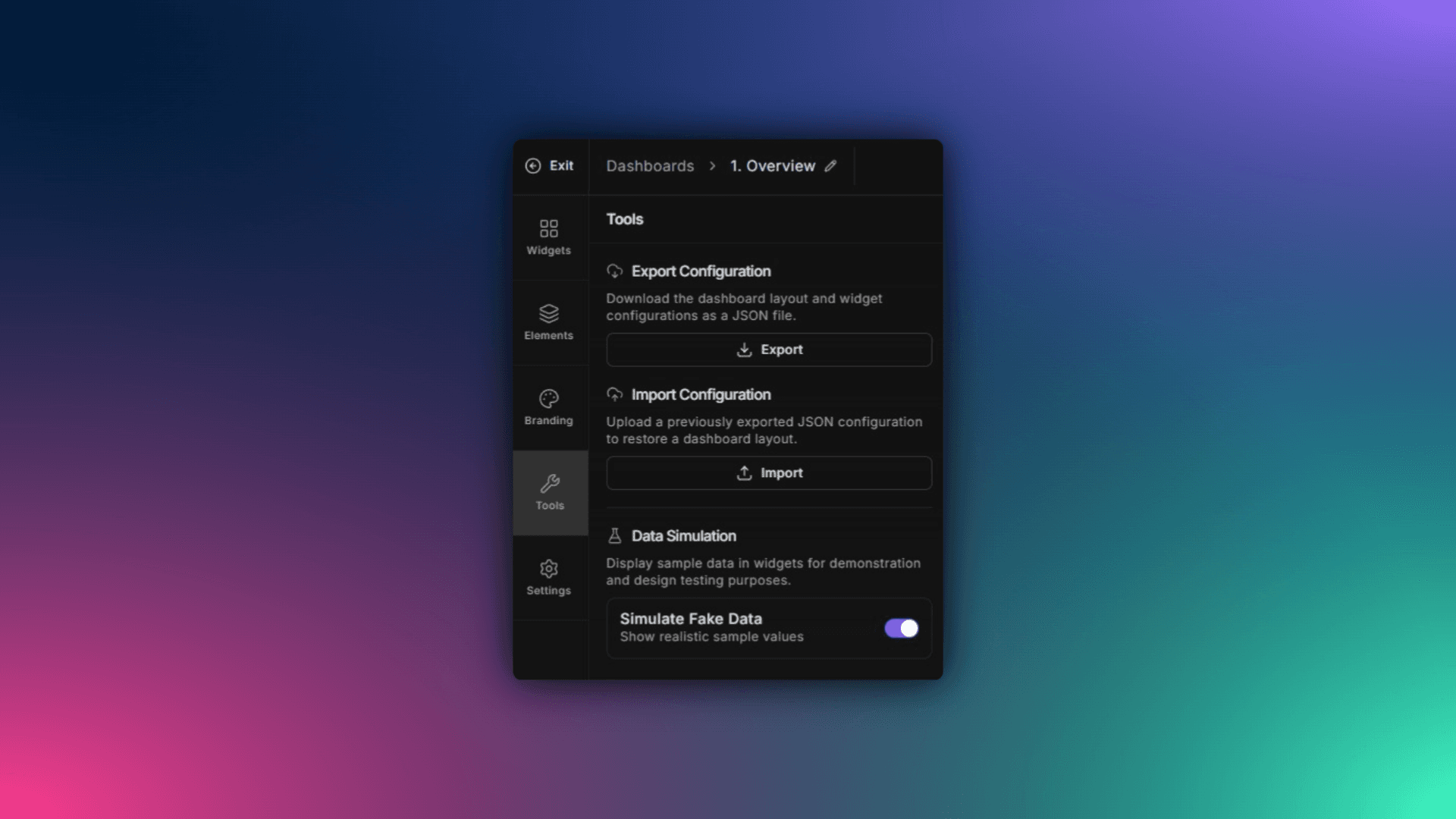
ControlCom Connect now lets you simulate data on any dashboard, even when your variables have no live values. You can see exactly how your final design will look with realistic data flowing through charts, gauges, and widgets.
No more guessing. No more waiting for equipment to come online.
How It Works
Enable simulation mode: Toggle simulated data on any dashboard from the designer's Tools tab.
See your layout in action: Widgets populate with representative values so you can evaluate spacing, thresholds, and visual balance
Build demo accounts: Create polished, fully-functional demos for prospective clients or internal stakeholders without connecting to real assets
Why It Matters
For integrators building customer-facing dashboards, this means you can finalize designs before a single PLC is wired. For OEMs creating demo environments, you get a realistic showcase without shipping test equipment.
Whether you're pitching a new SCADA monitoring project or onboarding a water utility, simulated data helps you present a finished product—not a placeholder.
December 26, 2025
Skip Repeated MFA Prompts with Trusted Devices
What's New
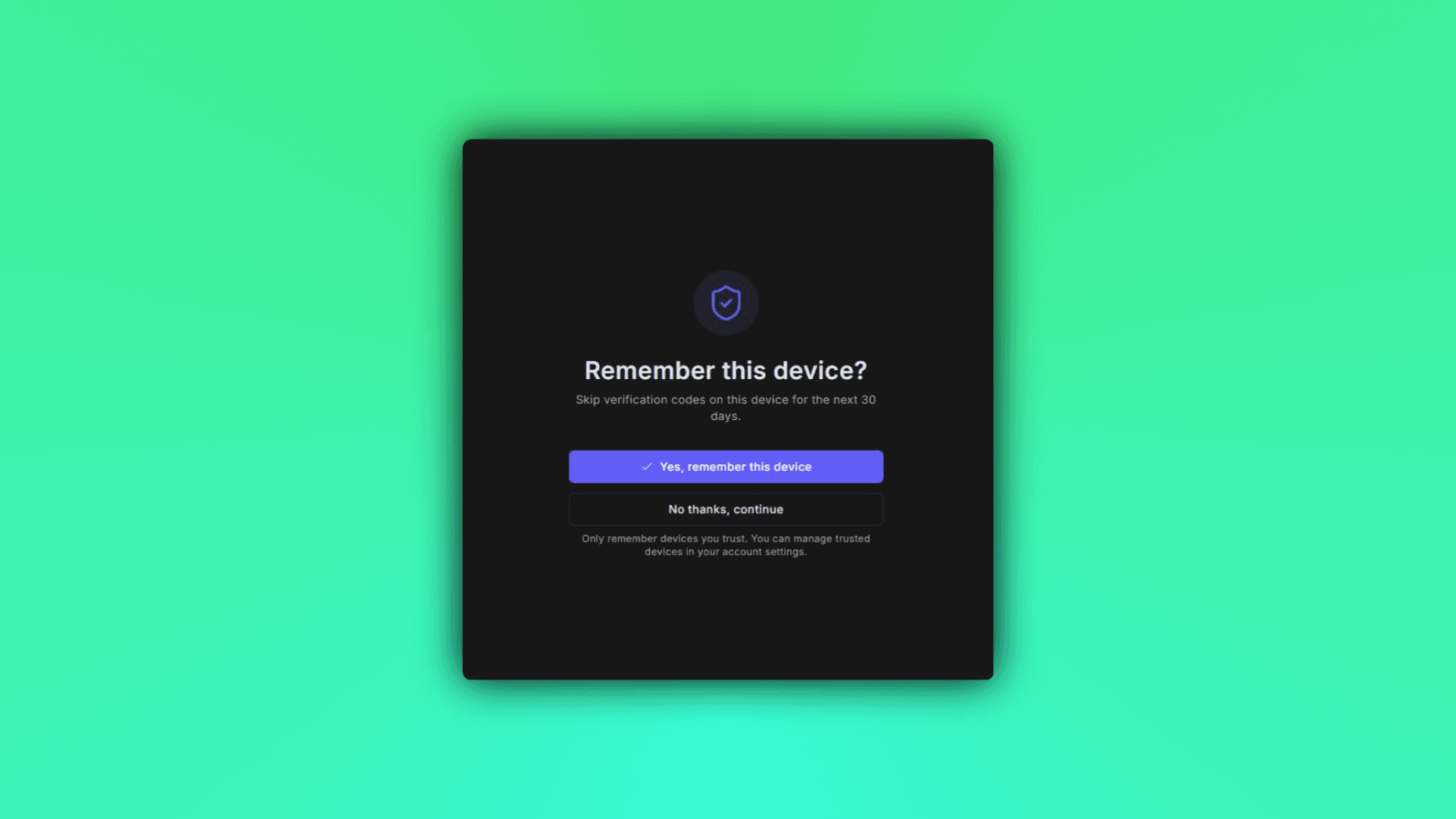
ControlCom Connect now lets you trust devices for multi-factor authentication. Once you verify a device, you won't be prompted for an MFA code every time you log in from that same browser or machine.
This is especially useful for integrators and plant managers who access the platform multiple times a week from the same secure workstation. You stay protected without the friction of repeated code entries.
How It Works
Trust a device at login: After entering your MFA code, check the option to remember the device
Manage trusted devices: View and remove trusted devices anytime from your account security settings
Stay in control: Revoke trust instantly if a device is lost, shared, or no longer in use
Why It Matters
For teams managing remote monitoring across water/wastewater systems, manufacturing floors, or distributed commercial sites, logging in shouldn't slow you down. Trusted devices mean faster access to alarms, dashboards, and analytics—without compromising security.
December 17, 2025
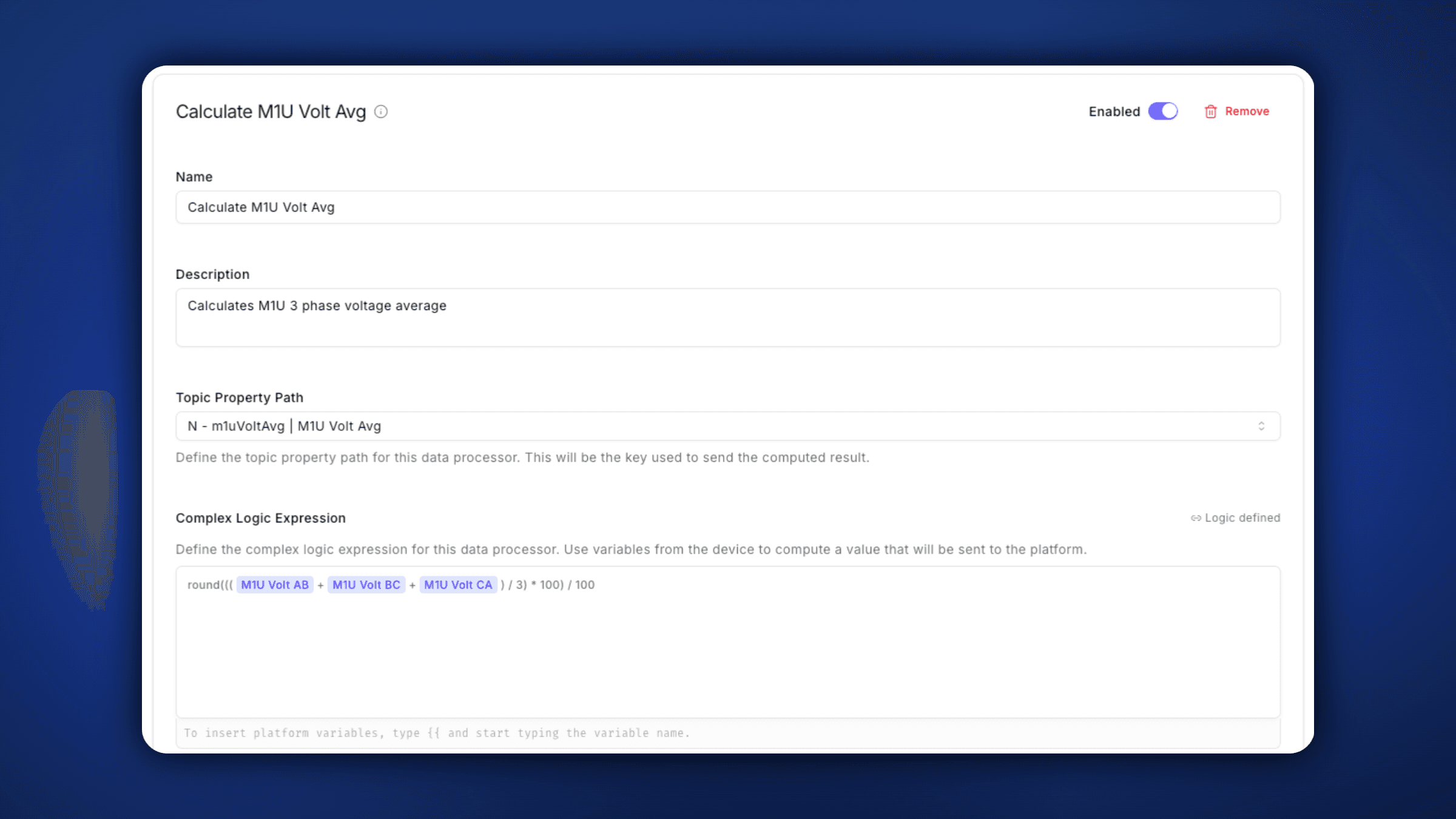
Data Processors: Complex Logic at the Edge
The new Data Processors feature brings powerful real-time computation capabilities directly to the ControlCom Edge Server, version 2.7.0
Value Transforms modify incoming sensor data on-the-fly using mathematical expressions before publishing—ideal for unit conversions, scaling factors, or threshold-based type conversions. Each transform is ranked, allowing multiple operations to chain together for complex processing pipelines.
Virtual Variables take this a step further by enabling computed values that don't exist in the physical data source. By referencing multiple real variables in an expression (e.g., device_var1 + device_var2), you can create derived metrics like totals, averages, or conditional flags—calculated and published alongside raw data.
Both features support numeric, boolean, and string return types, with graceful error handling that logs issues without disrupting data flow. The result: faster, smarter edge intelligence.
December 10, 2025
ControlCom Connect Now Open to Developers and Integrators
Build custom integrations, dashboards, and automation on ControlCom Connect. Public access now available for developers and integrators.
Build What Your Customers Actually Need
ControlCom Connect is now open to developers and integrators who want to build on a proven IIoT platform.
Until now, access was limited to existing customers and partners. That changes today.
What's Available
Full API access to device data, alerts, and historical trends
Webhook support for real-time event triggers
Documentation to help guide you through the configuration process
White-label options for OEMs and system integrators
Who This Is For
If you're an integrator building remote monitoring solutions for water/wastewater, manufacturing, healthcare facilities, or commercial & industrial clients, you can now use ControlCom Connect as your foundation instead of starting from scratch.
Connect PLCs, SCADA systems, and sensors from any manufacturer. Build dashboards your customers will actually use. Ship faster.
Getting Started
Visit the pricing page to choose your plan
Create your developer account
Start building
No sales calls required. No waiting for approval.
December 1, 2025
Enhanced Dark Mode With Higher Contrast
We've given Dark Mode a fresh new look. Based on user feedback, we've moved away from our previous muted color palette to a higher-contrast theme designed for improved legibility and reduced eye strain. Whether you're looking at dashboards late into the evening or working in low-light environments, the updated Dark Mode delivers sharper text, clearer UI elements, and a more refined visual experience—without sacrificing the sleek aesthetic you expect from ControlCom Connect.
True Neutral Tones for Seamless Branding
We've also eliminated the blue shift that was present in our previous dark theme. The new color palette uses true neutral tones, ensuring your brand colors, charts, and data visualizations render accurately without unwanted color distortion. Your dashboards now look exactly as intended—letting your branding take center stage.
November 24, 2025
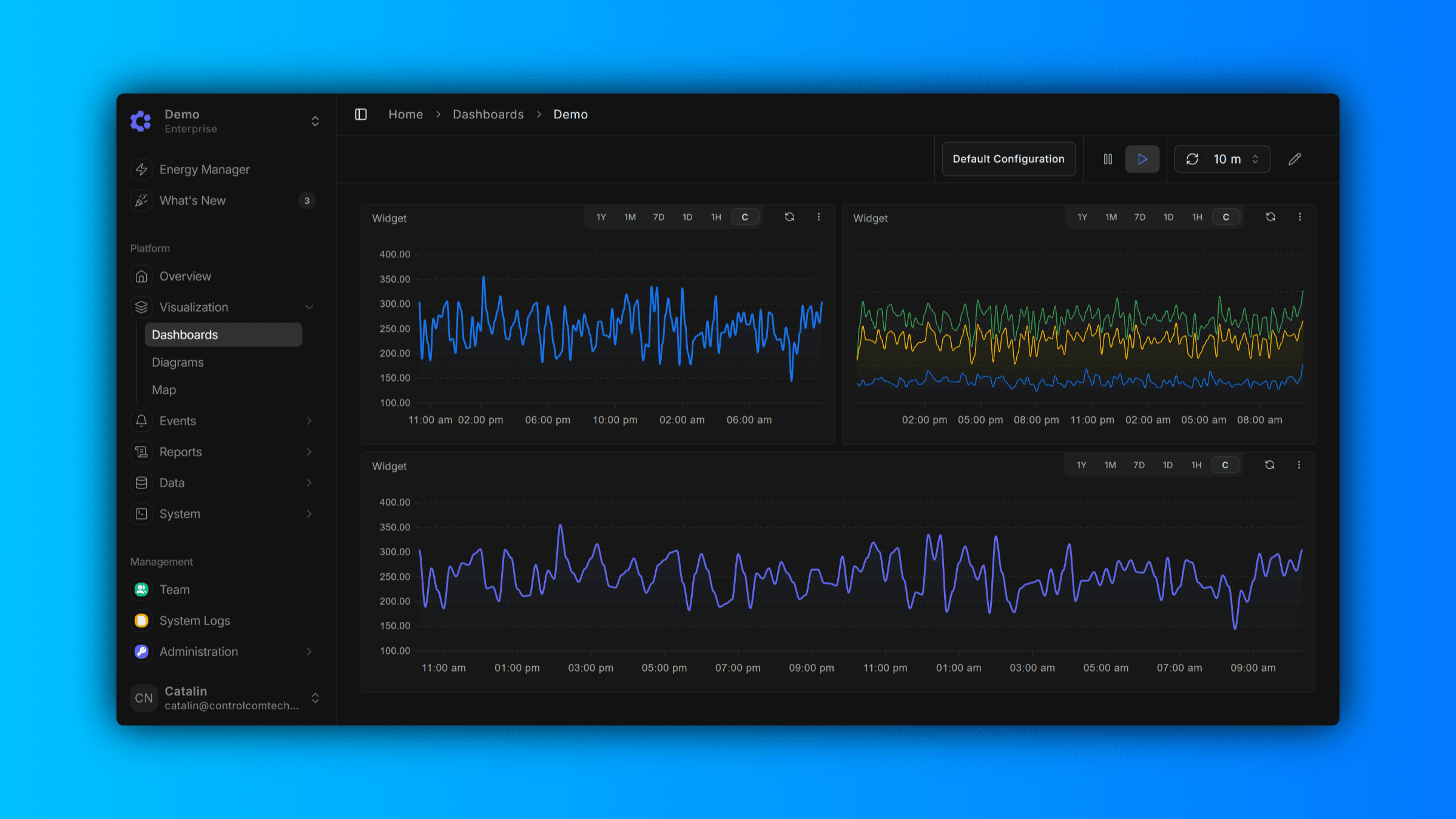
Billing Explorer
The Billing Explorer provides a comprehensive view of your usage metrics and associated costs, allowing you to monitor which variables are being tracked and consumed across your account. Data is aggregated on an hourly basis, giving you granular visibility into usage patterns and helping you identify usage.
Use the Billing Explorer to drill down into specific time periods, compare usage across different variables or devices, and gain actionable insights into your billing activity.
November 17, 2025
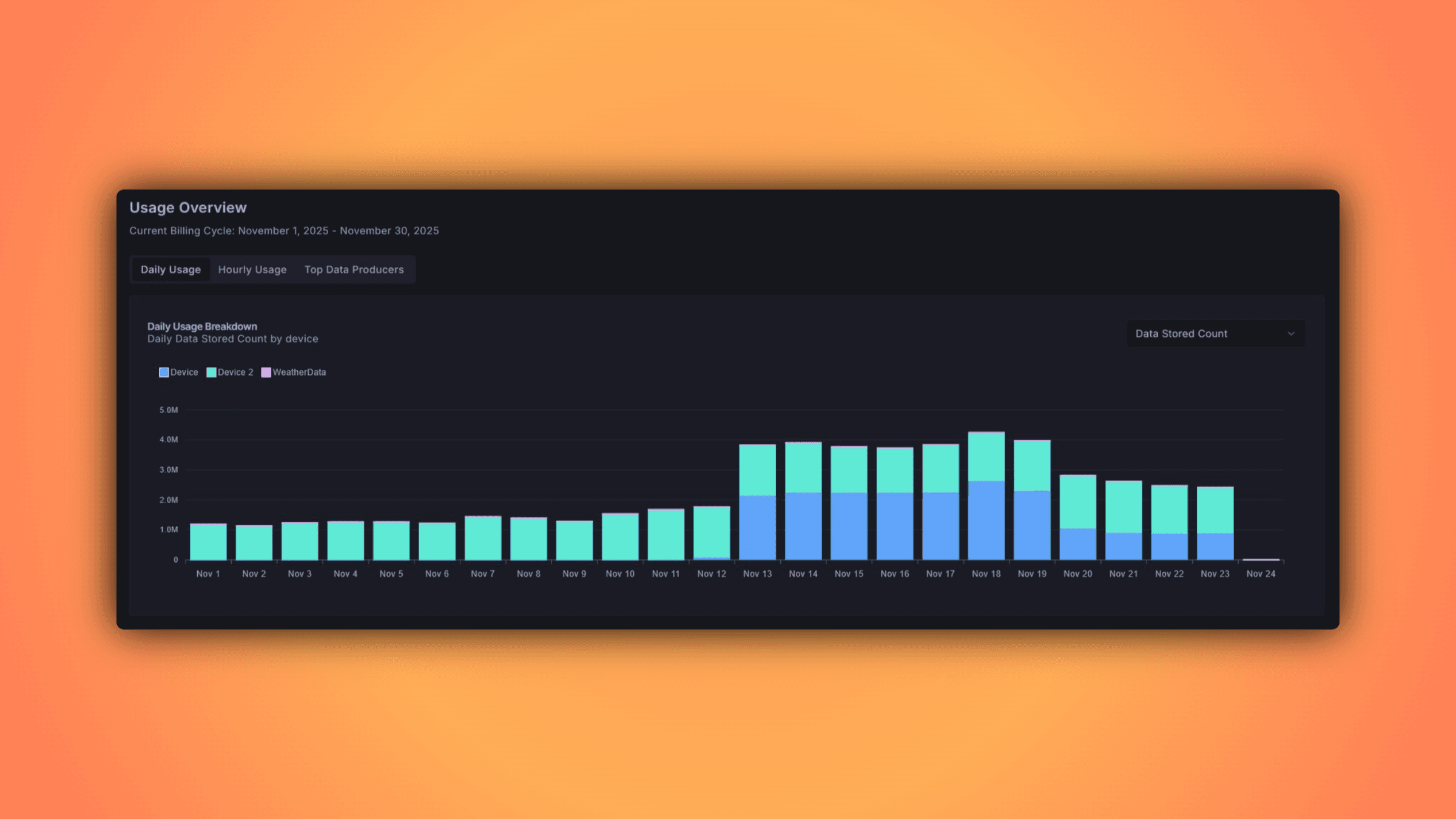
Audit Trail for Pro & Enterprise
Track every change to your organization's resources with our new audit trail feature—perfect for security compliance, internal audits, and maintaining visibility across your team's actions.
November 12, 2025
Edge HMI Auto Refreshes - 1.3.6
Version 1.3.6
The Edge HMI now has the capability to dynamically refresh its view if there was a diagram or dashboard change on the ControlCom Connect platform. All it requires is for the Edge Server to be restarted to pull latest changes.
No need to close the Edge HMI application and relaunch it!
November 11, 2025
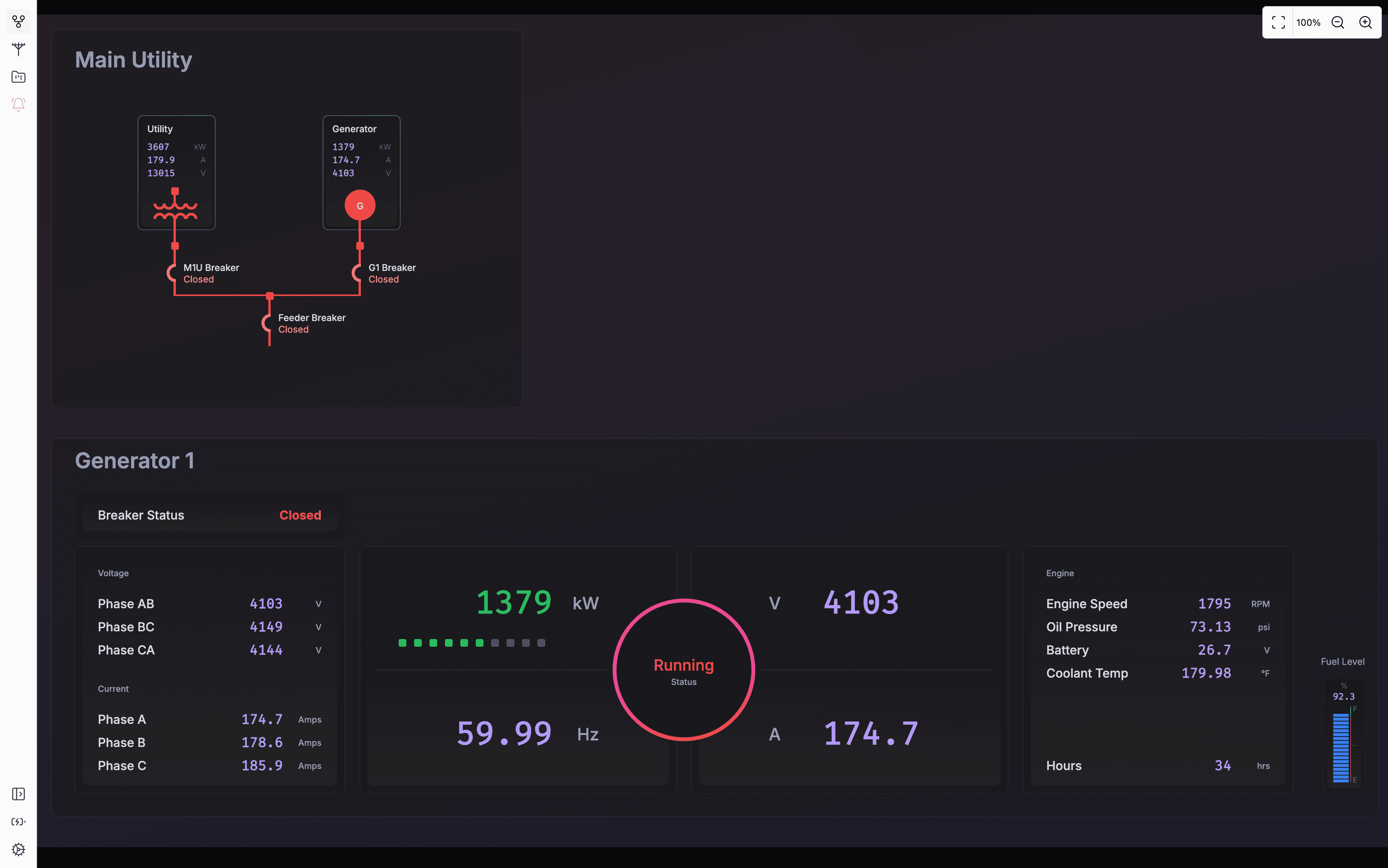
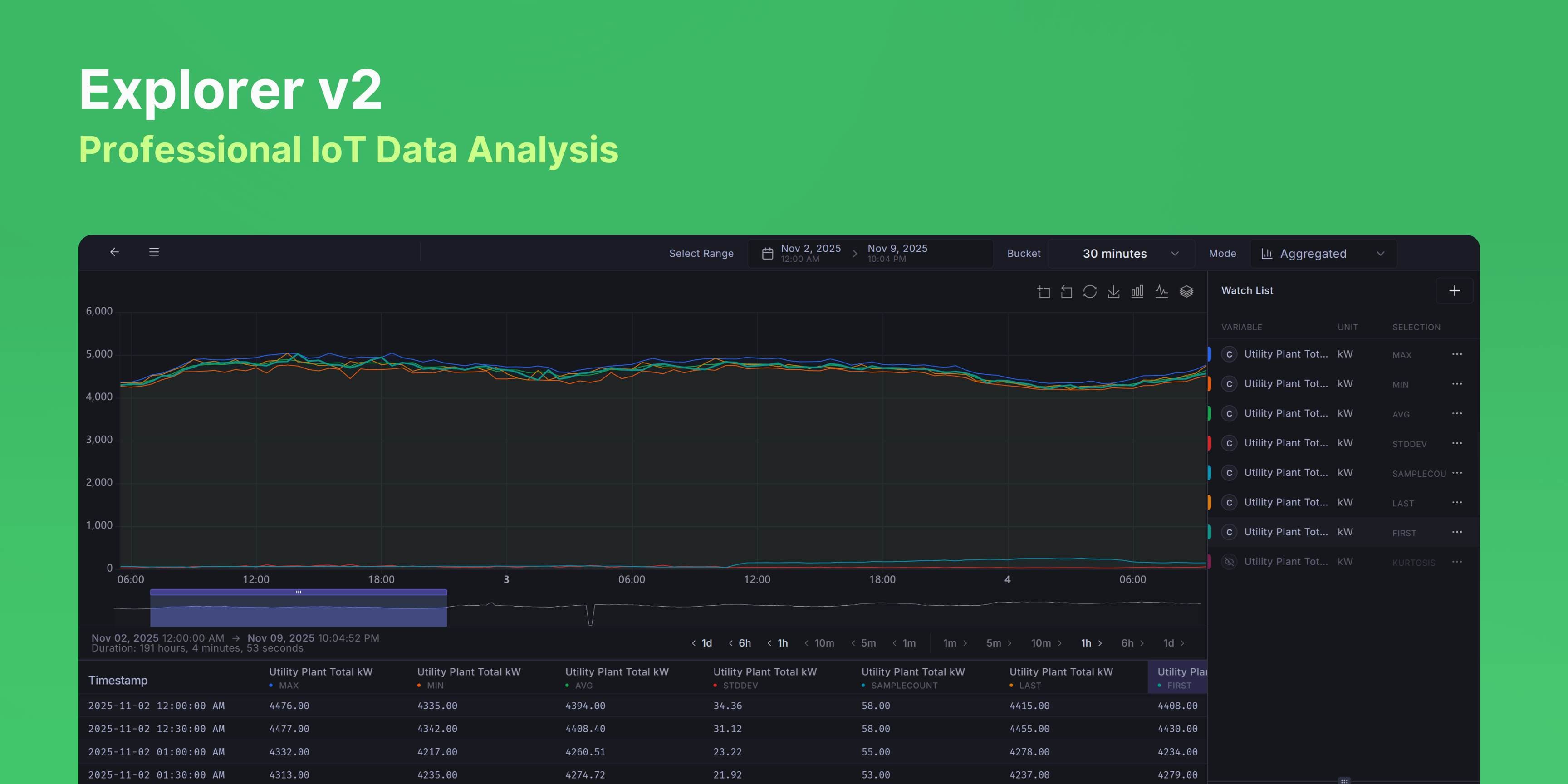
Explorer v2, Professional IoT Time-Series Data Analysis
Overview
Explorer v2 is a professional-grade time-series data visualization and analysis tool designed for IoT device monitoring and operations. It provides real-time and historical data exploration with advanced statistical analysis, intelligent time-range management, and high-performance rendering capable of handling 10,000+ data points smoothly.
What's New
Raw Mode — See unprocessed sensor data for the last hour. Great for troubleshooting recent issues or checking what's happening right now. Limited to 16 variables max to keep things fast.
Aggregated Mode — View statistical summaries over any time range. Add the same variable multiple times with different aggregations (MIN, MAX, AVG, etc.) to compare patterns. No variable limits.
In Aggregated Mode, you can view data as MIN, MAX, AVG, SUM, Standard Deviation, Sample Count, Kurtosis, First Value, or Last Value. Add the same sensor multiple times with different aggregations to see the full picture — like plotting MIN, MAX, and AVG of a temperature sensor together to see its range.
Buckets have range requirements (e.g., 1-hour buckets need at least 24 hours of data). When you pick an incompatible bucket, Explorer suggests three ways to fix your time range: extend/shrink the end date, extend/shrink the start date, or center and adjust both. Click any suggestion and it applies the fix, switches buckets, and refreshes your data.
Renders 10,000+ data points smoothly without lag. Panels resize by dragging, charts zoom and pan, and hovering table columns highlights the chart series. Time jump buttons let you skip forward/backward by preset intervals. Export to CSV with one click.
How people use it
For troubleshooting, switch to Raw Mode and look at the last hour of unprocessed data. For monthly reports, use Aggregated Mode with 1-day buckets and plot MIN, MAX, and AVG together to show daily ranges. To find problem devices, compare the Standard Deviation across multiple devices — high variability usually means something's wrong.
Coming soon
Alarm overlays on the timeline, annotations for specific time periods, and side-by-side time range comparison.
November 7, 2025
Diagram Editor - History Retention
Diagram editor now keeps your edit history. Undo and redo your changes without losing work.
Useful when you're making lots of small adjustments and want to revert without manually fixing everything.
November 5, 2025
SMS Two-Factor Authentication Now Available
Users can now enable SMS-based two-factor authentication (2FA) to add an extra layer of security to their accounts.